
Edit Cloud Service VLAN and/or Bandwidth and/or metadata
Introduction
After a Cloud Service has been provisioned you can change the following:
Change VLANs
Change Bandwidth
Change Metadata (that is to say, PO Number, Customer Reference and Contract Reference)
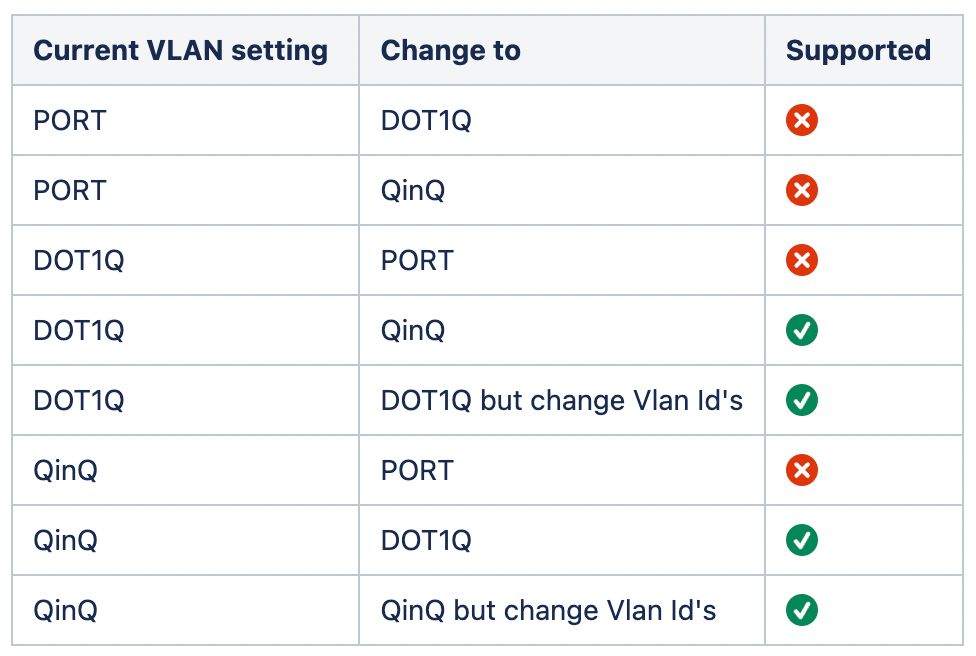
Supported VLAN changes
The following changes are supported for changing Cloud Service VLANs.
Please refer to the V2 IX-API open api specification here https://docs.ix-api.net (officially published).
This specification covers the API described in the steps below.
1. Request Client Credentials
(If you already have client credentials skip to step 2.)
Follow the description on this page Requesting IX-API Client Credentials
You shall receive the credentials via separate emails:
EMAIL 1 shall contain client_id, login URL and IX-API URL
EMAIL 2 shall contain client_secret
2. Edit VLAN of a Cloud Service
Step 1: Use client credentials to generate an access token
Make the following request to generate an access token:
curl --location --request POST 'https://{{login-url}}/connect/token' \
--header 'content-type: application/x-www-form-urlencoded' \
--data-urlencode 'grant_type=client_credentials' \
--data-urlencode 'client_id=<client_id>' \
--data-urlencode 'client_secret=<client_secret>'
The response is a http 200 OK with response body containing the access token.
{
"access_token": "{YOUR_TOKEN}",
"expires_in": 3600,
"token_type": "Bearer",
"scope": "resource.api resource.ixapi resource.productcatalogapi"
}
The access token in the response shall be used in all subsequent requests.
Authentication
When you make an API call, you need to use an “Authorization” HTTP header to provide your API key, with a “Bearer” prefix. For example:
Authorization: Bearer {YOUR_TOKEN}
Step 2: Read the configurations of the cloud service
Read the configurations of the cloud service by making the following request i.e. return all subscriber and provide side configurations of the cloud service.
curl --request GET \
--url 'https://{{IX-API url}}/ixapi/v2/network-service-configs?network_service={{Cloud Service Id}} ' \
  --header 'Authorization: Bearer {YOUR_TOKEN}'
The response shall return an http response code of 200 OK with the following response body.
[
{
"id": "3c55b0ef-5e3e-4654-9353-27130919c780",
"cloud_vlan": null,
"vlan_config": {
"vlan_type": "dot1q",
"vlan": 205,
"vlan_ethertype": "0x8100"
},
"handover": 1,
"role_assignments": [],
"state": "production",
"billing_account": "A0087999",
"capacity": 50,
"connection": "CANL-051364",
"consuming_account": "A0087999",
"contract_ref": "contract:31824",
"external_ref": "IX:Service:23042",
"managing_account": "A0087999",
"network_service": "CSNL-051365",
"product_offering": "aws-dc",
"purchase_order": "Project: DC Moon",
"type": "cloud_vc"
},
{
"id": "8ccaec54-7c3f-4795-ac50-5d81ef14ecb9",
"cloud_vlan": null,
"vlan_config": {
"vlan_type": "dot1q",
"vlan": 2,
"vlan_ethertype": "0x8100"
},
"handover": 1,
"state": "production",
"billing_account": "A0087999",
"capacity": 50,
"connection": "CSP-AWSS-UK",
"consuming_account": "A0065927",
"managing_account": "A0065927",
"network_service": "CSNL-051365",
"product_offering": "aws-dc",
"type": "cloud_vc"
}
]
For each handover of the Cloud Service, a subscriber and provider configuration shall be returned, where each pair shall be bound by the same handover value. In the example above there is only one handover. You can only change the VLAN configuration of the subscriber side configuration. The subscriber side configuration can be determined because it will have
your account(s) as "managing_account" and "consuming_account"
your cloud access port as the connection
Step 3: Change Dot1q VLAN Id
Make the following request to change the Dot1q VLAN Id on the cloud service:
curl --request PATCH \
--url https://{{IX-API url}}/ixapi/v2/network-service-configs/{{Cloud Service Id}} \
--header 'Authorization: Bearer {{YOUR TOKEN}}' \
--data '{
"type": "cloud_vc",
"vlan_config": {
"vlan_type": "dot1q",
"vlan": 301
}
}'
An http 200 OK response shall be returned with the following response body
{
"id": "3c55b0ef-5e3e-4654-9353-27130919c780",
"cloud_vlan": null,
"vlan_config": {
"vlan_type": "dot1q",
"vlan": 301,
"vlan_ethertype": "0x8100"
},
"handover": 1,
"role_assignments": [],
"state": "production_change_pending",
"billing_account": "A0087999",
"capacity": 50,
"connection": "CANL-051364",
"consuming_account": "A0087999",
"contract_ref": "contract:31824",
"external_ref": "IX:Service:23042",
"managing_account": "A0087999",
"network_service": "CSNL-051365",
"product_offering": "aws-dc",
"purchase_order": "Project: DC Moon",
"type": "cloud_vc"
}
Note the response includes the new "vlan" Id and "state" of the resource is "production_change_pending", meaning the change is accepted and is being provisioned on the network.
Once the change has completed, the "state" of the resource shall be returned as "production".
When the resources is in "state" of "production_change_pending" you can submit more changes and the final one in a sequence of one or more shall be the last one applied.
Step 4: Change Dot1q to QinQ
Make the following request to change the Dot1q VLAN Id on the cloud service:
curl --request PATCH \
--url https://{{IX-API url}}/ixapi/v2/network-service-configs/{{Cloud Service Id}} \
--header 'Authorization: Bearer {{YOUR TOKEN}}' \
--data '{
"type": "cloud_vc",
"vlan_config": {
"vlan_type": "qinq",
"inner_vlan": "33"
}
}'
Note, where an "outer_vlan" value is not included the existing "vlan" value shall be preserved.
An http 200 OK response shall be returned with the following response body
{
"id": "3c55b0ef-5e3e-4654-9353-27130919c780",
"cloud_vlan": null,
"vlan_config": {
"vlan_type": "qinq",
"outer_vlan": 301,
"outer_vlan_ethertype": "0x8100",
"inner_vlan": 33
},
"handover": 1,
"role_assignments": [],
"state": "production_change_pending",
"billing_account": "A0087999",
"capacity": 50,
"connection": "CANL-051364",
"consuming_account": "A0087999",
"contract_ref": "contract:31824",
"external_ref": "IX:Service:23042",
"managing_account": "A0087999",
"network_service": "CSNL-051365",
"product_offering": "aws-dc",
"purchase_order": "Project: DC Moon",
"type": "cloud_vc"
}
Note the response includes the preserved "outer_vlan" and "state" of the resource is "production_change_pending", meaning the change is accepted and is being provisioned on the network.
Once the change has completed, the "state" of the resource shall be returned as "production".
When the resources is in "state" of "production_change_pending" you can submit more changes and the final one in a sequence of one or more shall be the last one applied.
Step 5: Change QinQ outer_vlan and/or inner_vlan
Make the following request to change the QinQ "outer_vlan" and 'inner_vlan" on the cloud service:
curl --request PATCH \
--url https://{{IX-API url}}/ixapi/v2/network-service-configs/{{Cloud Service Id}} \
--header 'Authorization: Bearer {{YOUR TOKEN}}' \
--data '{
"type": "cloud_vc",
"vlan_config": {
"vlan_type": 'qinq',
"outer_vlan": "909",
"inner_vlan": "808"
}
}'
An http 200 OK response shall be returned with the following response body
{
"id": "3c55b0ef-5e3e-4654-9353-27130919c780",
"cloud_vlan": null,
"vlan_config": {
"vlan_type": "qinq",
"outer_vlan": 909,
"outer_vlan_ethertype": "0x8100",
"inner_vlan": 808
},
"handover": 1,
"role_assignments": [],
"state": "production_change_pending",
"billing_account": "A0087999",
"capacity": 50,
"connection": "CANL-051364",
"consuming_account": "A0087999",
"contract_ref": "contract:31824",
"external_ref": "IX:Service:23042",
"managing_account": "A0087999",
"network_service": "CSNL-051365",
"product_offering": "aws-dc",
"purchase_order": "Project: DC Moon",
"type": "cloud_vc"
}
Note the "state" of the resource is "production_change_pending", meaning the change is accepted and is being provisioned on the network.
Once the change has completed, the "state" of the resource shall be returned as "production".
When the resources is in "state" of "production_change_pending" you can submit more changes and the final one in a sequence of one or more shall be the last one applied.
Step 6: Change QinQ to dot1q
Make the following request to change QinQ vlan type to Dot1q.
curl --request PATCH \
--url https://{{IX-API url}}/ixapi/v2/network-service-configs/{{Cloud Service Id}} \
--header 'Authorization: Bearer {{YOUR TOKEN}}' \
--data '{
"type": "cloud_vc",
"vlan_config": {
"vlan_type": 'dot1q'
}
}'
An http 200 OK response shall be returned with the following response body
{
"id": "3c55b0ef-5e3e-4654-9353-27130919c780",
"cloud_vlan": null,
"vlan_config": {
"vlan_type": "dot1q",
"vlan": 909,
"vlan_ethertype": "0x8100"
},
"handover": 1,
"role_assignments": [],
"state": "production_change_pending",
"billing_account": "A0087999",
"capacity": 50,
"connection": "CANL-051364",
"consuming_account": "A0087999",
"contract_ref": "contract:31824",
"external_ref": "IX:Service:23042",
"managing_account": "A0087999",
"network_service": "CSNL-051365",
"product_offering": "aws-dc",
"purchase_order": "Project: DC Moon",
"type": "cloud_vc"
}
Note
the "outer_vlan" value is preserved as the "inner_vlan" value. Where the vlan value is not explicitly set the existing value shall persist.
the "state" of the resource is "production_change_pending", meaning the change is accepted and is being provisioned on the network.
Once the change has completed, the "state" of the resource shall be returned as "production".
When the resources is in "state" of "production_change_pending" you can submit more changes and the final one in a sequence of one or more shall be the last one applied.
3. Edit Bandwidth or metadata of a Cloud Service
The metadata that can be changed are the following:
"external_ref": "Test External Ref",
"purchase_order": "Test PO Number",
"contract_ref": "Test Contract Ref"
Step 1: Use client credentials to generate an access token
Make the following request to generate an access token:
curl --location --request POST 'https://{{login-url}}/connect/token' \
--header 'content-type: application/x-www-form-urlencoded' \
--data-urlencode 'grant_type=client_credentials' \
--data-urlencode 'client_id=<client_id>' \
--data-urlencode 'client_secret=<client_secret>'
The response is a http 200 OK with response body containing the access token.
{
"access_token": "{YOUR_TOKEN}",
"expires_in": 3600,
"token_type": "Bearer",
"scope": "resource.api resource.ixapi resource.productcatalogapi"
}
The access token in the response shall be used in all subsequent requests.
Authentication
When you make an API call, you need to use an “Authorization” HTTP header to provide your API key, with a “Bearer” prefix. For example:
Authorization: Bearer {YOUR_TOKEN}
Step 2: Read the cloud service
Use the Cloud Service Id to read the cloud service by making the following request to see the current bandwidth.
curl --request GET \
--url 'https://{{IX-API url}}/ixapi/v2/network-services/{{Cloud Service Id}} ' \
  --header 'Authorization: Bearer {YOUR_TOKEN}'
The response shall return an http response code of 200 OK with the following response body.
{
"id": "CSUK-052542",
"state": "production",
"nsc_required_contact_roles": [],
"provider_ref": "2ceff501-d1cc-4f25-b00b-ab5a1e532c4e/europe-west2/2",
"capacity": 200,
"diversity": 1,
"status": [],
"consuming_account": "A0087999",
"external_ref": "IX:Service:23042",
"managing_account": "A0087999",
"product_offering": "google-ci.lhr-zone2-47.LON.200",
"type": "cloud_vc",
"billing_account": "A0087999",
"contract_ref": "123456",
"purchase_order": "Owais A1 Test 14022023",
"cloud_key": "2ceff501-d1cc-4f25-b00b-ab5a1e532c4e/europe-west2/2"
}
The above response body shows that this cloud service use a "product_offering" that is for Google with a 200 Mb bandwidth. To change bandwidth a new product offering has to be selected and submitted.
Step 3: Change Bandwidth of Cloud Service
Use the following PATCH request to change the bandwidth of a Cloud Service
curl --request PATCH \
--url https://{{IX-API url}}/v2/network-services/{{Cloud Service Id}} \
--header 'Authorization: Bearer {YOUR_TOKEN}' \
--header 'Content-Type: application/json' \
--data '{
"type": "cloud_vc",
"product_offering": "google-ci.lhr-zone2-47.LON.100",
"external_ref": "Test External Ref",
"purchase_order": "Test PO Number",
"contract_ref": "Test Contract Ref" }'
The response to the above request is an http 200Ok with the following response body:
{
"id": "CSUK-052542",
"state": "production_change_pending",
"nsc_required_contact_roles": [],
"provider_ref": "2ceff501-d1cc-4f25-b00b-ab5a1e532c4e/europe-west2/2",
"capacity": 100,
"diversity": 1,
"status": [],
"consuming_account": "A0087999",
"external_ref": "IX:Service:23042",
"managing_account": "A0087999",
"product_offering": "google-ci.lhr-zone2-47.LON.100",
"type": "cloud_vc",
"billing_account": "A0087999",
"contract_ref": "123456",
"purchase_order": "Owais A1 Test 14022023",
"cloud_key": "2ceff501-d1cc-4f25-b00b-ab5a1e532c4e/europe-west2/2"
}
The change to bandwidth and metadata has been accepted and the state of the resource is "production_change_pending". The above request can support any combination of bandwidth and metadata i.e. one property or two property or three property.
The resource should be polled and when the state changes to "Production" the change is applied.
There is no restriction on the number of changes. However, if a change is being processed and a new change is submitted, the current will be parked and the latest change processed and applied.
Step 4: Read the cloud service state to determine if the changes have been applied
Make the following request to review the state of the cloud service.
curl --request GET \
--url 'https://{{IX-API url}}/ixapi/v2/network-services/{{Cloud Service Id}} ' \
  --header 'Authorization: Bearer {YOUR_TOKEN}'
The response shall return an http response code of 200 OK with the following response body.
{
"id": "CSUK-052542",
"state": "production",
"nsc_required_contact_roles": [],
"provider_ref": "2ceff501-d1cc-4f25-b00b-ab5a1e532c4e/europe-west2/2",
"capacity": 200,
"diversity": 1,
"status": [],
"consuming_account": "A0087999",
"external_ref": "IX:Service:23042",
"managing_account": "A0087999",
"product_offering": "google-ci.lhr-zone2-47.LON.200",
"type": "cloud_vc",
"billing_account": "A0087999",
"contract_ref": "123456",
"purchase_order": "Owais A1 Test 14022023",
"cloud_key": "2ceff501-d1cc-4f25-b00b-ab5a1e532c4e/europe-west2/2"
}
When the state changes from "production_change_pending" to "production" the change requested has been completed.